Practical bilingual reading
How to Make a Bilingual EPUB You Will Want to Keep Reading
A reader-first EPUB workflow: choose a reflowable source, check a preview, keep translations close, and prepare the result for an e-reader.
Start with a reflowable EPUB
A good EPUB lets you change type size and have text reflow naturally. That is what makes it pleasant on Kindle, phone, or tablet. Open the book in an EPUB reader and enlarge the text: if the chapter rewraps cleanly, you have the kind of source that suits bilingual reading.
Books with image-only pages, fixed screenshots of text, or unusual scripted layouts are a different project. They may look like ebooks, but they do not give a translation workflow the paragraph structure needed to keep original and translation together.
Decide which language leads the reading
For language study, put the language you are learning first and keep translation immediately nearby. For casual reading in a less familiar language, you may prefer translation first. The important thing is consistency: a reader should know what to expect from every paragraph.
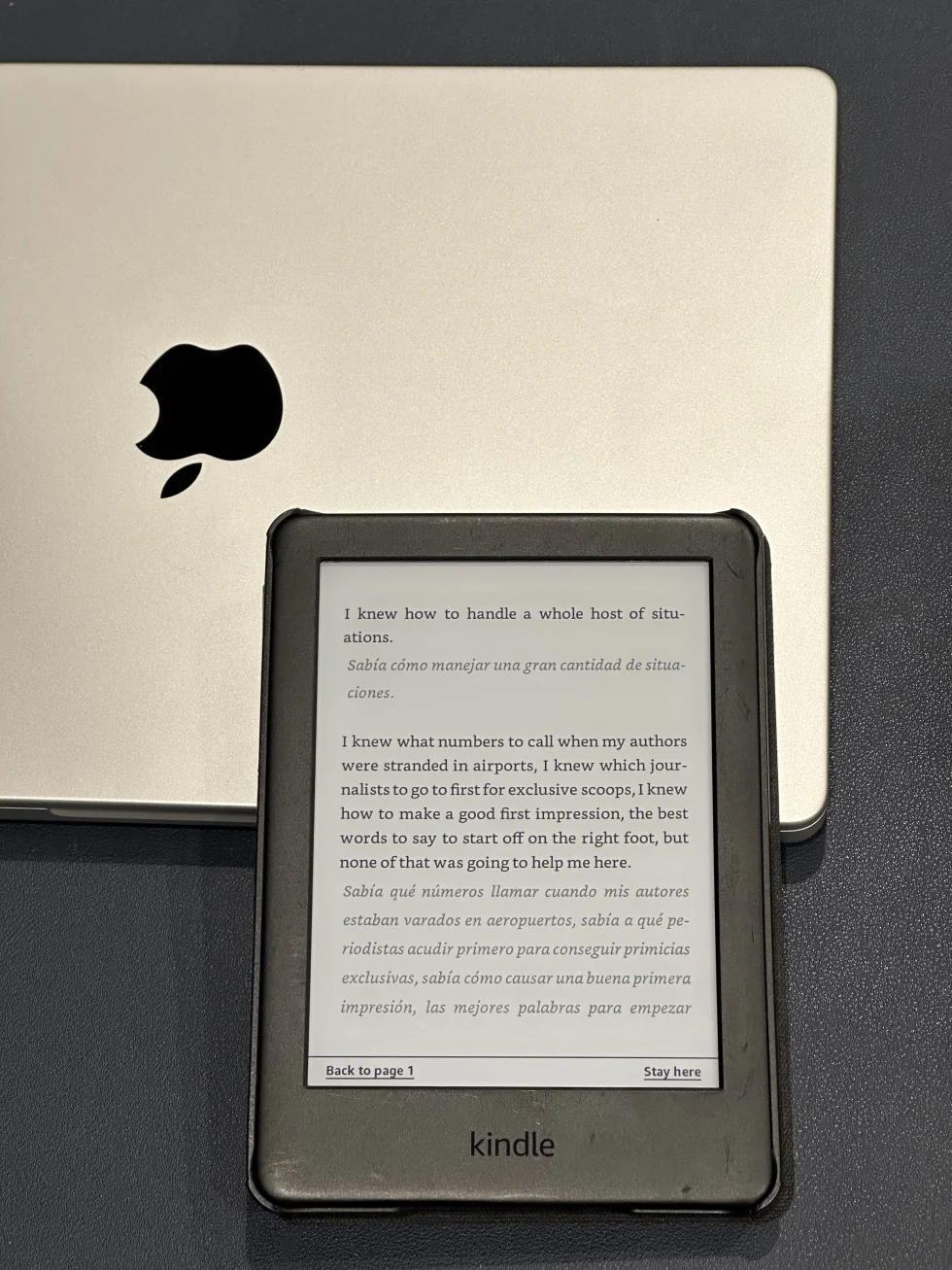
The Kindle output keeps English and Spanish within one continuous chapter. It is not a pair of parallel apps or a separate translated edition. That single flow is what makes a bilingual EPUB practical for a commute or an evening chapter.
Preview a real chapter
Choose a preview section with normal narration and dialogue if the book has both. Check whether paragraphs remain distinct, whether translation is easy to find, and whether changing font size still feels comfortable. A title page tells you almost nothing about the real experience.
Check punctuation, chapter headings, and one long sentence too. These details are where an output starts to feel like a book rather than an exported dataset.
Prepare the finished EPUB for your device
Once reading flow looks right, download the bilingual EPUB and open it in your preferred reader or send it to an e-reader that supports EPUB delivery. Keep the original too, especially if you may later want to revisit a passage without translation support.
BilingualText is designed for this reflowable-book workflow: upload a standard EPUB, choose a language pair, inspect a preview and credit estimate, then create a downloadable reading copy. Use material you have the right to process and let the preview decide whether a book is a good candidate.
Keep the bilingual book pleasant after the first chapter
The novelty of seeing two languages together wears off quickly if the book is uncomfortable. Choose a text size you can read without squinting, keep chapter breaks clear, and avoid a translation style that makes every paragraph look equally important. A good EPUB should invite another chapter.
Check the book at the font size you normally use, not the default size that made the screenshot look neat. Translation often makes a paragraph longer, and a layout that is calm at one size can become crowded at another. Reflow is useful only if it still feels readable after adjustment.
Give yourself permission to change direction after a preview. Some books are better read as source-only with occasional dictionary lookup; others benefit greatly from a nearby translation. The aim is not to convert every ebook but to make the right books more accessible.
When you finish a bilingual EPUB, keep any notes that helped and remove the rest. The file should remain a book you can revisit for pleasure, not an archive of every moment you did not understand.