Practical bilingual reading
How to Translate a PDF Without Losing the Parts That Make It Readable
A practical way to translate a text-based PDF while keeping headings, paragraphs, tables, and the original close enough to check.
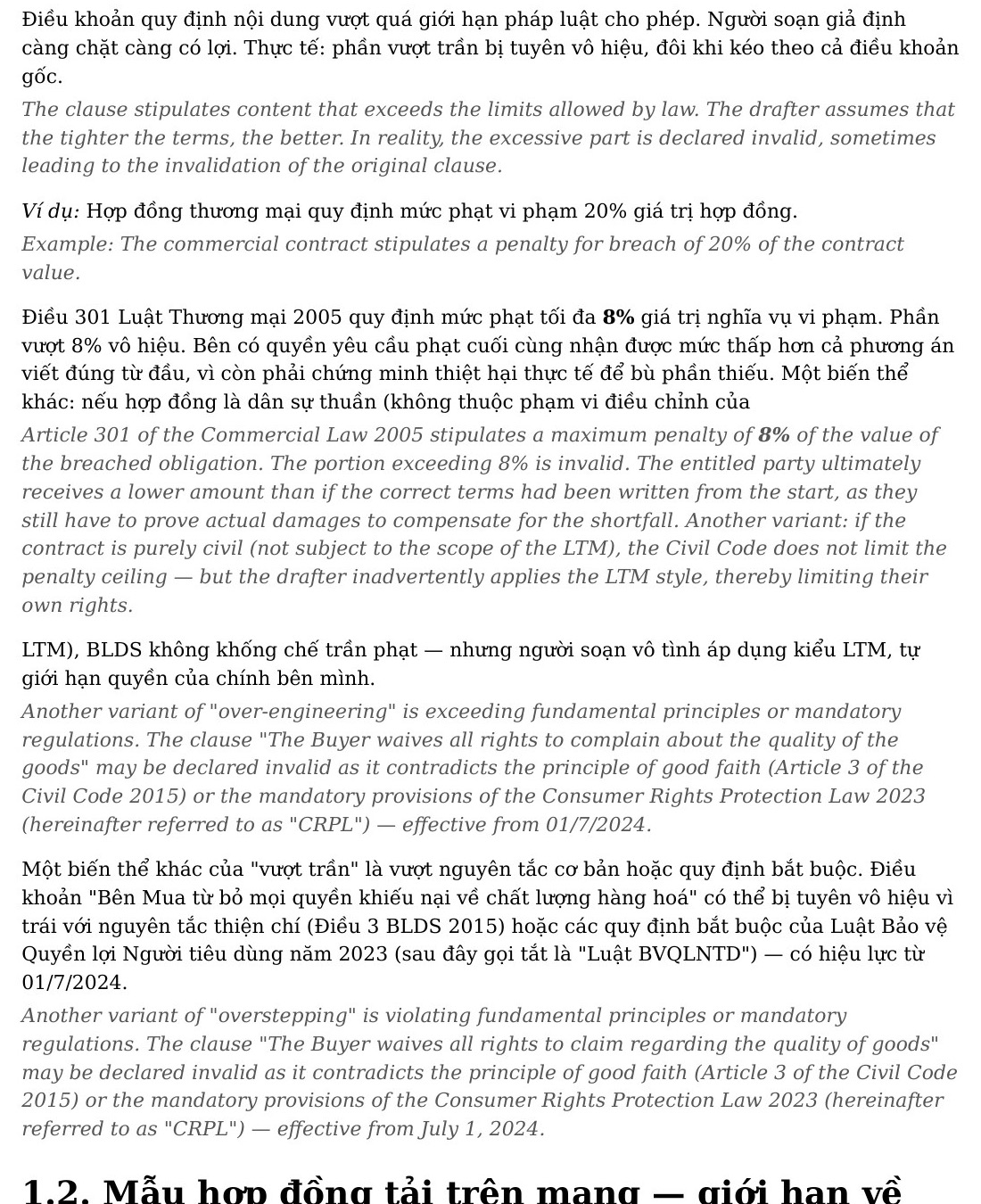
A readable result matters more than a visual photocopy
Translating the text inside a PDF is easy. Keeping the document readable afterward is the harder part. A copied translation may contain all the right words and still be miserable to use because headings lose their hierarchy, long paragraphs become walls of text, and the reader cannot tell which sentence belongs to which original passage.
For reports, handbooks, policies, and research material, the best result is rarely a pixel-for-pixel clone. It is a reading copy that preserves meaningful structure: a heading stays with its section, a paragraph stays whole, and the translation sits close enough to check without opening a second document.
Start by checking what kind of PDF you have
Open the file, select one complete sentence, and paste it into a blank note. If it arrives in the right order, the PDF has a usable text layer. That is the useful starting point: the document contains text rather than a photograph of text.
A selectable PDF can still be awkward. Columns may copy in the wrong order, footnotes may interrupt a paragraph, and tables may need more care than ordinary prose. Those are structure problems. An image-only scan is different: it needs OCR before a translation workflow can reliably recognise words at all.
- Selectable text is usually suitable for a bilingual reading copy.
- Strange copied order means you should inspect a preview.
- A whole page selecting at once is a sign to run OCR first.
What the real output shows
The page above comes from an anonymized Vietnamese-to-English production handbook. The English is not squeezed into the source line spacing. Each Vietnamese block remains intact and its translation follows as a softer, separate block. A reader can read normally, glance down when a phrase needs checking, and continue.
Small choices carry the page. A section title signals a new idea. Bold terms survive inside longer passages. The source and translation have different visual roles, so your eye is not repeatedly asking which language it is reading. That is the practical meaning of preserving formatting: preserving the cues that let a document make sense.
A workflow that avoids the usual mess
Keep a copy of the original, then check a representative page: one normal paragraph, one heading, and one table or list if the PDF has them. A short preview tells you more than a perfect-looking first sentence. You are checking whether the document still has a reading rhythm after translation.
BilingualText is useful here because it rebuilds text-based PDFs around readable blocks rather than asking you to paste translated text back into fixed page geometry. For legal, technical, or academic material, still review important wording before relying on it; layout quality and content accuracy are different questions.
When to stop and fix the source
Stop if a heading has become part of the paragraph before it, if a translated block has been split across unrelated source text, or if a familiar table can no longer be understood without the original open beside it. Those are not cosmetic defects. They are signs that the document's structure has stopped carrying its meaning.
A common temptation is to press on because most of the document looks acceptable. That can be reasonable for casual personal reading, but it is a poor trade for a contract, technical procedure, or paper you will revisit. Fixing a bad text layer, a wrong reading order, or an image-only source early is cheaper than trying to read around the problem later.
Also separate layout decisions from translation decisions. A beautifully spaced page can still contain a mistranslated term, and a sound translation can be tiring when it is packed into the wrong format. Review the two things independently: first ask whether you can navigate the page, then ask whether important wording needs a subject-matter check.
The strongest preview is therefore not the prettiest page. It is the page that contains the kind of difficulty you will encounter repeatedly. If that page works, the rest of the document has a much better chance of becoming something you actually open again.